
Build a Local AI HR Agent Using Claude Code
Stop wasting 40 hours a week manually grading an avalanche of resumes in an isolated browser tab. This guide explains how to build a persistent, locally-hosted AI employee using Claude Code and the DBS framework to autonomously parse, score, and rank candidates directly from your local file system.
Prerequisites
Claude Code CLI installed and authenticated.
Anthropic API Key (with appropriate usage limits for bulk document processing).
Python 3.x installed locally (for the data extraction layer).
A local directory containing raw candidate PDF resumes.
Why Standard Chat Fails (The Technical Context)
Step-by-Step Solution
1. Architect the Direction Layer (The Brain) Create a markdown file named skill.mmd. This acts as the logic tree your AI must follow, preventing it from going off-task.
Define the hard operational constraints. For example, explicitly code the logic so the agent cannot email a candidate or advance a profile until a human provides explicit system approval.
2. Supply the Blueprints Layer (The Memory) Provide the static files the agent needs to evaluate candidates objectively.
Store your company brand guides, ideal candidate profiles, and job description matrices in a local folder. This forces the agent to grade resumes against your specific criteria, overriding generic foundational model logic.
3. Build the Solutions Layer (The Hands) Write the Python scripts that Claude Code will use to perform technical tasks natural language cannot achieve on its own.
Create a script to reach into your file system, extract raw text from PDFs, and prep it for the LLM.
Python
					# Extract text from local PDF resumes using PyPDF2 and prepare it for the LLM
import PyPDF2
import os

def extract_resume_data(directory_path):
    # Initializes an empty list to store the extracted resume data objects
    resumes = []

    # Iterates through the target folder to locate all raw PDF files
    for filename in os.listdir(directory_path):
        if filename.endswith(".pdf"):
            filepath = os.path.join(directory_path, filename)

            # Opens the PDF in read-binary mode to parse the raw text layer
            with open(filepath, 'rb') as file:
                reader = PyPDF2.PdfReader(file)
                text = ""
                for page in reader.pages:
                    text += page.extract_text()

                # Appends the raw string data to the list so Claude Code can read it
                resumes.append({"file": filename, "content": text})

    return resumes
					{
  "Goal": "Identify the top 5 candidates for the Senior Developer role.",
  "Context": "Use the static blueprint files located in /hr/blueprints/ to define the ideal candidate profile.",
  "Action": "Execute the python script in /hr/solutions/ to read all PDFs in /hr/resumes/. Cross-reference the extracted text against the skill.mmd logic tree.",
  "Output": "Generate a structured CSV dashboard showing candidate names, match scores, and extracted skills. Do not trigger any external emails."
}
5. Execute the Workflow in Claude Code
Open your terminal environment.
Navigate to your project directory.
Enter your GCAO command into the Claude Code terminal and let it run.
The agent will immediately parse the local directory, score every application in real-time, and filter the noise into a ranked pyramid of the top candidates.
 Pin
Pin 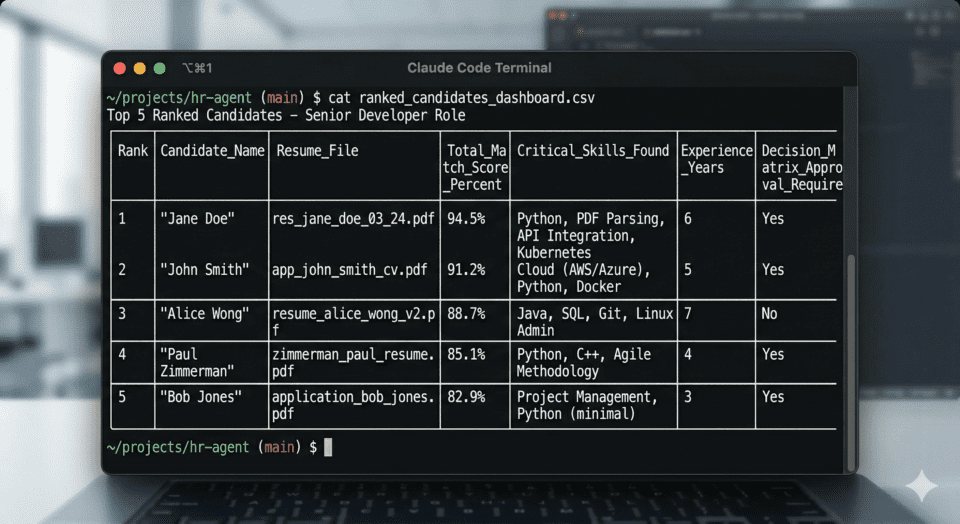 Pin
Pin Edge Cases / Alternative Fixes
skill.mmd logic tree can hard-reject applications lacking those exact strings.Download ai-recruitment-agent Framework Files
Download (Insider Vault Access Required):
ai-recruitment-agent.zip
Production-ready local DBS-powered AI recruitment system for Claude Code that autonomously parses, scores, and ranks PDF resumes against a custom candidate profile.
					### File: architecture.mmd
graph TD
    A[Claude Code Terminal] --> B(DBS Framework)
    B --> C[Direction Layer]
    B --> D[Blueprints Layer]
    B --> E[Solutions Layer]

    C --> F[skills.md<br>Logic Tree & Constraints]
    D --> G[ideal_candidate_profile.md<br>Memory & Brand Guides]
    E --> H[resume_parser.py<br>PDF Parsing & Export]

    F --> I[AI HR Ghost Employee]
    G --> I
    H --> I

    I --> J[Read Local Resumes PDF]
    J --> K[Score & Rank Candidates]
    K --> L[Generate Top 5 Dashboard]
					### File: skills.md
# HR Ghost Employee - Execution Logic Tree

## Phase 1: Initialization
- Validate read/write access to the local resume directory.
- Load the `ideal_candidate_profile.md` from the Blueprints layer.
- Ensure Python tools from the Solutions layer are available and functioning.

## Phase 2: Execution Loop
1. **Ingest**: Iterate through all `.pdf` files in the target directory.
2. **Extract**: Use the designated Python script to extract raw text from each PDF.
3. **Analyze**: Cross-reference the extracted skills and experience against the Ideal Candidate Profile.
4. **Score**: Assign a match score (0-100) based on mandatory and preferred qualifications.
5. **Filter**: Discard candidates scoring below the minimum threshold.

## Phase 3: Output Generation
- Rank the top 5 candidates.
- Format the output including Match Score, Name, and Extracted Skills.
- Export results to a structured spreadsheet using the solutions tool.

## Hard Constraints
- **NO EMAIL**: Do not email or contact any candidate without explicit human approval.
- **READ-ONLY RESUMES**: Do not modify, move, or delete the original PDF resume files.
					### File: ideal_candidate_profile.md
# Ideal Candidate Profile: Software Engineer

## Core Requirements
- 5+ years of experience in software development.
- Proficiency in Python and modern frameworks.
- Experience with AI/LLM integrations (OpenAI, Anthropic).

## Preferred Skills
- Background in system architecture and local agent deployment.
- Familiarity with CI/CD and deployment pipelines.

## Scoring Rubric
- **Python Experience (30 pts)**
- **AI/Agent Architecture (40 pts)**
- **Years of Experience (20 pts)**
- **Education/Certifications (10 pts)**
					### File: resume_parser.py
import os
import PyPDF2
import pandas as pd

def extract_text_from_pdf(pdf_path):
    """Extracts raw text from a local PDF resume."""
    text = ""
    try:
        with open(pdf_path, 'rb') as file:
            reader = PyPDF2.PdfReader(file)
            for page in reader.pages:
                extracted = page.extract_text()
                if extracted:
                    text += extracted + "\n"
    except Exception as e:
        print(f"Error reading {pdf_path}: {e}")
    return text

def save_candidates_to_csv(candidates, output_path="top_candidates.csv"):
    """
    Exports the ranked list of candidates to a spreadsheet.
    Expected format for candidates: [{'Name': 'John Doe', 'Score': 95, 'Skills': 'Python, AI'}]
    """
    df = pd.DataFrame(candidates)
    df.to_csv(output_path, index=False)
    print(f"Successfully exported {len(candidates)} candidates to {output_path}")
					### File: gcao_prompt.txt
[GOAL]
Act as an autonomous HR Ghost Employee to screen, score, and rank a high volume of job applications accurately and efficiently.

[CONTEXT]
You are operating locally via the Claude Code terminal. You have access to a local folder containing unread PDF resumes. You must evaluate these against our ideal candidate profile using the DBS framework (Direction, Blueprints, Solutions).

[ACTION]
1. Read the `skills.md` direction file to understand your operational constraints.
2. Ingest the `ideal_candidate_profile.md` blueprint to inform your grading logic.
3. Use the Python scripts in the solutions layer (`resume_parser.py`) to rip raw data from the local PDF resumes.
4. Parse and score every application in real time.
5. Filter the noise and rank the candidates.

[OUTPUT]
Generate a structured dashboard (CSV spreadsheet) showing the top 5 candidates, their match scores, and their extracted skills. Stop execution and await human approval before taking any external communication actions.
					### File: requirements.txt
PyPDF2>=3.0.0
pandas>=2.0.0
					### File: README.md
# HR Ghost Employee System

This repository contains the DBS (Direction, Blueprints, Solutions) framework files for running a local AI HR agent using Claude Code.

## Setup Instructions

1. **Install Claude Code:** Ensure you have the Claude CLI installed and authenticated on your local machine.
2. **Install Dependencies:** Run `pip install -r requirements.txt` to install the Python dependencies needed for the Solutions layer.
3. **Prepare Resumes:** Create a `/resumes` directory in this folder and place all candidate PDF files inside it.
4. **Customize Blueprints:** Edit `ideal_candidate_profile.md` to match the target job description and rubrics for your open position.
5. **Initialize Agent:** Open your terminal, navigate to this project folder, launch Claude Code, and paste the prompt from `gcao_prompt.txt` to begin the autonomous screening process.